
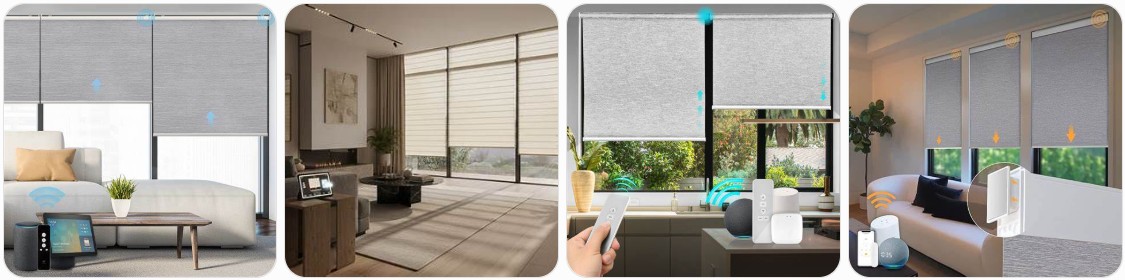
Smart blinds are one of the easiest ways to upgrade a room with convenience, privacy, light control, and smart-home automation. This guide explains what smart blinds are, how they work, how much they usually cost, where to buy them online, what to check before ordering, and whether DIY or professional installation makes more sense for your home.
- Table of Contents:
- Smart Blinds At a Glance
- What Are Smart Blinds? How Smart Blinds Work?
- Smart Blinds Pros and Cons
- Smart Blinds Cost
- Where to Buy Smart Blinds Online
- How to Find Smart Blinds Stores Near You
- What to Check Before Buying Smart Blinds
- Smart Blinds Installation Options
- FAQ About Smart Blinds
Smart Blinds At a Glance
- Best for: Bedrooms, living rooms, media rooms, hard-to-reach windows, large windows, smart homes, rental-friendly automation upgrades, and accessibility needs.
- Main benefit: You can open, close, schedule, and automate your blinds without manually pulling a cord or chain.
- Common controls: Remote control, smartphone app, wall switch, voice assistant, timer schedule, smart-home hub, or sunlight/temperature sensor.
- Popular styles: Smart roller blinds, motorized blackout blinds, smart cellular shades, automated Venetian blinds, smart zebra blinds, and retrofit motor kits for existing blinds.
- Typical price range: Around $60 to $250 per window for budget ready-made smart blinds, $250 to $700+ per window for custom smart blinds, and $30 to $150 for some retrofit motor kits.
- Power options: Rechargeable battery, replaceable battery pack, plug-in power adapter, hardwired electrical connection, or solar charging add-on.
- Smart-home compatibility: Many smart blinds work with Alexa, Google Home, Apple Home, SmartThings, Zigbee, Z-Wave, Matter, Wi-Fi, Bluetooth, or brand-specific hubs.
- Installation difficulty: DIY-friendly for many ready-made battery-powered models, but professional fitting is better for hardwired blinds, very large windows, high windows, or whole-home installations.
- Biggest thing to check: Measure correctly and confirm the blind size, power type, control method, hub requirement, mounting style, and return policy before buying.
What Are Smart Blinds? How Smart Blinds Work?
What Are Smart Blinds?
Smart blinds are window blinds or shades with a built-in motor and electronic control system. Instead of raising or lowering the blind by hand, you can control it with a remote, app, timer, voice command, or smart-home automation. In simple terms, Smart Blinds are motorized window coverings that can connect to your home technology so they operate more conveniently and automatically.
They are especially useful when you want better comfort, easier privacy control, or less daily effort. For example, you can schedule bedroom blinds to open gradually in the morning, close living room blinds at sunset, lower sunny-side blinds during the hottest part of the day, or close all blinds at night with one button. This makes them popular for modern homes, apartments, offices, media rooms, nurseries, senior-friendly spaces, and rooms with tall or difficult-to-reach windows.
Smart blinds are not only one product style. The “smart” part usually refers to the motor and control system, while the blind itself can be a roller blind, cellular shade, blackout shade, Venetian blind, zebra blind, Roman shade, or another window covering. That means you should choose smart blinds based on both the technology and the fabric or blind type. A smart blackout roller blind may be ideal for a bedroom, while a smart solar shade may be better for a bright office or living room where you want glare reduction without making the room too dark.
How Smart Blinds Work?
Smart blinds work by using a small motor inside the headrail, roller tube, or lift mechanism. When you press a remote button, tap an app, use a voice command, or trigger an automation, the motor moves the blind up, down, open, closed, or to a saved position. Depending on the blind design, the motor may roll fabric around a tube, lift a shade, tilt slats, or move a track system.
Most smart blinds use one of several connection methods. Wi-Fi models may connect directly to your home network, although some still need a bridge or hub. Zigbee, Z-Wave, Thread, Matter, or Bluetooth models may require a compatible hub, bridge, or smart-home controller. Some simpler motorized blinds are not fully “smart” by themselves but can become smarter when paired with a hub or compatible controller.
Power is another important part of how smart blinds work. Battery-powered smart blinds are the easiest for most homeowners because they do not require electrical wiring. Many use rechargeable lithium batteries that may last several weeks or months per charge, depending on blind size, motor strength, usage, and fabric weight. Plug-in models are good when an outlet is nearby. Hardwired models are clean and reliable but usually require planning and professional installation. Some systems also offer solar panels that help keep the battery charged, especially on sunny windows.
Smart blinds can also work with routines. For example, you may create a “Good Morning” routine that opens the blinds and turns on lights, or a “Movie Mode” routine that lowers blackout shades and dims the room. More advanced setups can use sunlight, temperature, occupancy, or time-of-day automation to reduce glare, improve privacy, and help with indoor comfort.
If you are only starting out, it is usually easiest to buy a ready-made smart blind or smart roller shade first and test it in one room. If you already have blinds that you like, you may also consider a smart blind motor kit or smart blind opener that can automate some existing cord, chain, or tilt systems.

Motorized Blinds No Drill Automatic Blinds for Windows Cordless Roller Shades Electric Blinds with Remote Control Smart Blinds (White, 34.5 x 72)

SwitchBot Blind Tilt Motorized Blinds - Smart Electric Blinds, Automatic Blind Opener and Closer, Solar Powered, Light Sensing Control, Add Hub Mini to Make it Compatible with Alexa & Google Home

Hapadif Motorized Blinds No Drill Automatic Roller Shades with Remote Control Smart Electric Window Blinds (White, 35 x 72)
Smart Blinds Pros and Cons
Pros of Smart Blinds
- Very convenient: Open or close blinds from a remote, phone, voice assistant, or schedule.
- Great for hard-to-reach windows: Helpful for tall windows, skylight-style openings, stairwell windows, and windows behind furniture.
- Better privacy control: Schedule blinds to close automatically at night or when you are away.
- Improved light control: Set positions for morning light, afternoon glare, movie time, or sleeping.
- Can help with heat and glare: Automated closing during strong sun can reduce glare and make rooms more comfortable.
- Useful for accessibility: A good option for seniors, people with mobility limitations, or anyone who struggles with cords and chains.
- Cleaner look: Many smart blinds are cordless, which gives the window a neater appearance.
- Child and pet friendly: Cordless smart blinds reduce the risk associated with hanging cords.
- Works with smart-home routines: Many models can connect with Alexa, Google Home, Apple Home, SmartThings, or other systems.
- Can add a premium feel: Motorized blinds can make a room feel more modern, finished, and high-end.
Cons of Smart Blinds
- Higher upfront cost: Smart blinds usually cost more than standard manual blinds.
- Battery maintenance: Battery-powered models may need recharging or battery replacement.
- Compatibility can be confusing: Some blinds need a hub, bridge, app, or specific smart-home platform.
- Not all models fit every window: Large, narrow, unusually shaped, or very heavy blinds may limit your options.
- Installation may be harder: Hardwired or custom smart blinds often need professional fitting.
- Wi-Fi or hub problems can affect controls: App and automation features may depend on your network or smart-home system.
- Repairs can cost more: Motors, batteries, remotes, and control boards can be more expensive than basic blind parts.
- Returns can be limited: Custom smart blinds are often made to order and may not be easy to return.
- Noise varies by model: Some motors are quiet, while cheaper motors may be more noticeable.
- Setup takes time: You may need to pair remotes, connect apps, set limits, create schedules, and test automation.
Smart Blinds Cost: What Price Should You Expect?
Smart blinds usually cost more than regular blinds because you are paying for the blind material plus the motor, control system, battery or power supply, remote, app support, and sometimes a smart-home bridge. The final price depends on size, fabric, brand, power type, smart-home compatibility, and whether the blind is ready-made or custom.
As a general estimate, basic smart blind motor kits may cost around $30 to $150 each, depending on whether they control a chain, cord, wand, or tilt system. Ready-made smart roller blinds or motorized shades often start around $60 to $250 per window. Custom smart blinds commonly range from about $250 to $700+ per window, especially if you choose blackout fabric, premium materials, wide sizes, quiet motors, solar charging, or full smart-home integration.
Professional installation can add another $50 to $150+ per window in many cases, although whole-home projects may be priced differently. Hardwired smart blinds can cost more because they may require electrical work, planning, wall switches, transformers, or wiring hidden inside the wall or ceiling. If you want a quick estimate before shopping, use the blind cost estimator to compare size, blind type, installation, and upgrade costs.
- Retrofit smart blind motor kit: About $30 to $150 per blind.
- Budget ready-made smart blind: About $60 to $180 per window.
- Mid-range smart roller shade: About $150 to $350 per window.
- Custom smart blinds or shades: About $250 to $700+ per window.
- Professional installation: About $50 to $150+ per window, depending on location and complexity.
- Hub, bridge, or smart controller: About $30 to $150 if required.
- Solar charging accessory: About $20 to $100 per window, depending on the brand and system.
The cheapest option is not always the best value. A low-cost motor may be fine for a small lightweight roller blind, but larger blinds need stronger motors and better brackets. For bedrooms, blackout performance matters more than app features alone. For living rooms, fabric appearance and quiet operation may be more important. For smart homes, compatibility with your existing system is often worth paying extra for.
Where to Buy Smart Blinds Online
Amazon is one of the easiest places to compare smart blinds because you can browse ready-made sizes, motorized roller shades, blackout smart blinds, solar-powered options, remote-control blinds, and retrofit motor kits in one place. It is especially useful if you want a quick DIY option for one or two windows. When shopping on Amazon, check the product size chart carefully, confirm whether the blind is inside mount or outside mount, and read reviews that mention battery life, noise level, app setup, and smart-home compatibility.
For smart-home buyers, Amazon can also be useful for comparing accessories such as smart blinds hubs, motorized blackout smart blinds, smart roller shades, and solar panels for smart blinds. Before ordering, make sure the blind supports your preferred control method, such as remote only, Wi-Fi app, Alexa, Google Home, Apple Home, Zigbee, Matter, or another platform.
Find Smart Blinds from Amazon »
Motorized Blinds No Drill Automatic Blinds for Windows Cordless Roller Shades Electric Blinds with Remote Control Smart Blinds (White, 34.5 x 72)
SwitchBot Blind Tilt Motorized Blinds - Smart Electric Blinds, Automatic Blind Opener and Closer, Solar Powered, Light Sensing Control, Add Hub Mini to Make it Compatible with Alexa & Google Home
Hapadif Motorized Blinds No Drill Automatic Roller Shades with Remote Control Smart Electric Window Blinds (White, 35 x 72)
eBay can be useful if you are looking for discounted smart blinds, open-box motorized blinds, replacement remotes, smart blind motors, discontinued parts, or brand-specific accessories. It is also a good place to search for retrofit blind motors if you want to automate an existing chain-operated blind without replacing the whole window covering.
When buying smart blinds from eBay, check the item condition, seller rating, return policy, shipping cost, and whether all required parts are included. For used or open-box smart blinds, confirm that the remote, charger, brackets, instructions, and hub are included if the system needs them. Also make sure the size works for your window, because blinds that are cut or custom-sized may not be adjustable enough for your opening.
- SmartWings – A popular online option for custom smart shades, motorized blinds, and smart-home compatible window coverings.
- Yoolax – Sells motorized shades, smart blinds, blackout shades, and custom window covering options for different rooms.
- Blinds.com – Offers a wide range of custom blinds and shades, including motorized and smart-control options from different brands.
- The Shade Store – A premium option for custom shades, professional measuring, design help, and motorized window treatments.
How to Find Smart Blinds Stores Near You
Finding smart blinds locally can be helpful if you want to see fabric samples, hear the motor noise, compare blackout levels, or get professional measuring before ordering. Smart blinds are more technical than basic manual blinds, so a local showroom or installer can help you avoid mistakes with size, mounting depth, power type, and smart-home compatibility.
Start by searching for terms such as “smart blinds near me,” “motorized blinds near me,” “automated shades near me,” “custom blinds installer,” or “window treatment showroom.” You can also use a general window blinds buying guide to compare different places to shop before deciding whether to buy locally or online.
When you contact a local store, ask whether they sell battery-powered, plug-in, and hardwired smart blinds. Also ask which smart-home systems they support. A good local installer should be able to explain whether the blinds work with Alexa, Google Home, Apple Home, SmartThings, Zigbee, Z-Wave, Matter, or a brand-specific app. If you already have a smart-home hub, tell them the exact model before they recommend products.
For the best results, bring your window measurements, photos of the windows, and notes about your goals. For example, tell the store whether you need blackout for sleeping, glare control for a TV, privacy for street-facing windows, child-safe cordless operation, or automation for high windows. This helps them recommend the right fabric, motor, mount style, and control system.
- Search locally: Use “smart blinds near me,” “motorized blinds installer,” or “automated window shades” in Google Maps.
- Check showrooms: Visit window treatment stores so you can compare fabrics, motors, and control options in person.
- Ask about measuring: Many local stores offer professional measuring, which helps prevent expensive custom-size mistakes.
- Confirm smart-home support: Do not assume every motorized blind works with every smart-home platform.
- Ask about warranty: Smart blinds have motors and electronics, so warranty coverage matters.
- Compare install pricing: Ask whether installation is charged per blind, per room, or as part of the full order.
What to Check Before Buying Smart Blinds
- Window measurements: Measure width and height carefully in multiple places. For inside mount, the smallest width usually matters most. For outside mount, allow extra overlap for better light blocking and privacy.
- Mounting style: Decide whether you want inside mount or outside mount. Inside mount looks cleaner but requires enough window depth. Outside mount can hide uneven frames and block more light.
- Blind type: Choose the right blind style for the room. Smart roller shades are simple and modern, blackout smart blinds are best for bedrooms, cellular smart shades can help with insulation, and smart Venetian blinds allow slat tilting.
- Power source: Check whether the blinds are rechargeable battery, replaceable battery, plug-in, hardwired, or solar-assisted. Battery models are easiest, while hardwired models are cleaner for new builds or major renovations.
- Battery life: Look for real user reviews about charging frequency. Larger blinds, heavier fabric, and frequent daily use can drain batteries faster.
- Control method: Confirm whether the blind includes a remote, app control, wall switch, voice control, schedules, or smart-home automation.
- Hub requirement: Some smart blinds need a separate hub or bridge. Check whether the hub is included or sold separately.
- Smart-home compatibility: Make sure the blinds work with your actual system, such as Alexa, Google Home, Apple Home, SmartThings, Zigbee, Z-Wave, Matter, Thread, Wi-Fi, or Bluetooth.
- Fabric opacity: Choose light filtering, room darkening, blackout, solar, or privacy fabric based on the room. Bedrooms usually need blackout, while offices may need glare reduction.
- Motor noise: Quiet motors are better for bedrooms, nurseries, offices, and early morning schedules.
- Weight and size limits: Every motor has limits. Very wide or heavy blinds may need stronger motors or multiple blinds instead of one large blind.
- Return policy: Ready-made blinds may be returnable, but custom smart blinds are often not returnable unless defective.
- Warranty: Check warranty coverage for the motor, battery, charger, remote, fabric, and electronic components.
- Replacement parts: Make sure chargers, remotes, brackets, batteries, and hubs are available if something fails later.
- App quality: Read reviews about the app setup, connection reliability, scheduling features, and whether the app is regularly updated.
- Manual backup: Some smart blinds offer manual control if the battery dies or the remote is lost, but many do not. Check this before buying.
- Room purpose: A smart blind for a bathroom needs moisture-friendly material, while a bedroom blind needs privacy and light blocking.
- Installation requirements: Check whether you need screws, brackets, a drill, anchors, a level, electrical wiring, or professional fitting.
Smart Blinds Installation Options: DIY vs Professional Fitting

Cutelec 2pcs Box Mounting Bracket for Low Profile Horizontal Blinds with 1-3/4" x 2 1/2" Headrail - White Color

Jetec 6 Pieces Mini Blind Brackets for Window Blinds,1.18x1.18 Inch | with Screws,Metal Replacement Parts,Easy DIY Installation
Smart blinds can be installed DIY or professionally, depending on the blind size, power type, mounting method, and your comfort level with tools. Many battery-powered smart roller blinds are designed for DIY installation. They usually come with brackets, screws, instructions, a charger, and a remote. If you can measure accurately, drill into the correct surface, level the brackets, and pair the remote or app, DIY installation can save money.
DIY installation works best for standard windows, lightweight blinds, battery-powered motors, and rooms where the blind is easy to reach. It is also a good choice if you are installing one or two smart blinds and do not need electrical wiring. Before starting, confirm the bracket position, test the blind before fully tightening everything, and set the upper and lower limits according to the instructions.
Professional installation is better for hardwired smart blinds, very wide blinds, high windows, bay windows, skylight-style windows, multi-window projects, and premium custom systems. It is also the safer choice if you want hidden wiring, wall switches, smart-home integration, or exact alignment across several windows. A professional installer can also help with measuring, product selection, motor strength, programming, and troubleshooting.
The main downside of professional fitting is the extra cost. However, it can be worth it if the blinds are expensive or custom-made. A measuring mistake on a custom smart blind can cost more than the installation fee, especially if the product cannot be returned. For whole-home projects, professional fitting can also make the final result look cleaner and more consistent.
- Choose DIY installation if: The blinds are battery-powered, the window is easy to reach, the size is standard, and you are comfortable using basic tools.
- Choose professional fitting if: The blinds are hardwired, oversized, custom-made, high up, heavy, or part of a larger smart-home setup.
- DIY tools you may need: Tape measure, pencil, drill, screwdriver, level, wall anchors, step ladder, and possibly a stud finder.
- Installation tip: Pair and test the motor before final installation when possible, so you know the remote, app, and limits work correctly.
- Smart setup tip: Label each blind in the app by room and window position, such as “Living Room Left” or “Bedroom Window,” to make voice commands easier.
FAQ About Smart Blinds
Are smart blinds worth buying?
Smart blinds are worth buying if you want convenience, better privacy control, scheduled opening and closing, cordless operation, or automation for hard-to-reach windows. They cost more than regular blinds, but the added comfort and control can be worth it for bedrooms, living rooms, offices, and smart homes.
What is the difference between motorized blinds and smart blinds?
Motorized blinds use a motor to open, close, raise, lower, or tilt the blind. Smart blinds are motorized blinds with extra connected features, such as app control, voice control, schedules, sensors, or smart-home integration. Some motorized blinds only use a remote, while smart blinds can usually connect to a wider automation system.
Do smart blinds need Wi-Fi?
Not always. Some smart blinds use Wi-Fi, while others use Bluetooth, Zigbee, Z-Wave, Thread, Matter, or a brand-specific hub. Some remote-control motorized blinds do not need Wi-Fi at all unless you want app control or voice assistant features.
Can smart blinds work with Alexa or Google Home?
Many smart blinds can work with Alexa or Google Home, but compatibility depends on the brand, motor, hub, and connection type. Always check the product listing before buying, because some blinds need a separate bridge or hub before voice control will work.
Can smart blinds work with Apple HomeKit or Apple Home?
Some smart blinds support Apple Home or HomeKit, but not all of them do. If you use an Apple smart-home setup, check specifically for Apple Home, HomeKit, Matter, or Thread compatibility before ordering. Do not assume every Wi-Fi smart blind will work with Apple Home.
How long do smart blind batteries last?
Battery life depends on the blind size, fabric weight, motor type, battery capacity, and how often the blind moves. Some rechargeable blinds may last weeks or months per charge. Large blinds or blinds that move several times per day usually need charging more often.
Can I install smart blinds myself?
Yes, many battery-powered smart blinds are DIY-friendly if you can measure accurately, mount brackets, and follow the pairing instructions. However, professional installation is better for hardwired blinds, large custom blinds, high windows, and whole-home systems.
Can I make my existing blinds smart?
Sometimes. Retrofit smart blind motors can automate some chain-operated roller blinds, tilt wands, cords, or loop systems. Compatibility depends on your existing blind mechanism, chain size, weight, mounting space, and the type of movement you want to automate.
Are smart blinds noisy?
Smart blinds make some motor noise, but the volume varies by brand and motor quality. Premium motors are usually quieter. If you plan to use smart blinds in a bedroom, nursery, or office, check reviews that mention noise level before buying.
Do smart blinds still work if the internet goes out?
Many smart blinds can still work with a remote even if the internet goes out. However, app control, voice commands, and cloud-based automations may stop working until your connection returns. Local hub-based systems may continue working better than cloud-only systems.
What type of smart blinds are best for bedrooms?
Smart blackout roller blinds or smart blackout cellular shades are usually best for bedrooms because they block more light and can be scheduled to open in the morning or close at night. For the darkest result, choose outside mount or side channels if available.
What type of smart blinds are best for living rooms?
Smart light-filtering shades, solar shades, zebra blinds, or smart Venetian blinds can work well in living rooms. The best choice depends on whether you want glare reduction, daytime privacy, outside view, decorative fabric, or adjustable slat control.
Are smart blinds safe for children and pets?
Many smart blinds are cordless, which makes them safer than blinds with dangling cords or chains. They are a good option for homes with children or pets, but you should still install them securely and follow the manufacturer’s safety instructions.
What happens if the smart blind battery dies?
If the battery dies, the blind may stop moving until it is recharged or the battery is replaced. Some models may offer manual control, but many motorized blinds do not. Check the manual backup options before buying if this matters to you.
Should I buy custom smart blinds or ready-made smart blinds?
Ready-made smart blinds are usually cheaper and faster to buy, but they only work well if your windows match available sizes. Custom smart blinds cost more but give a better fit, more fabric choices, and cleaner results for unusual windows or premium rooms.
Summary
Smart blinds are a practical upgrade if you want easier light control, better privacy, app control, voice commands, schedules, and smart-home automation. They are especially useful for bedrooms, living rooms, offices, tall windows, and hard-to-reach windows. The main tradeoff is cost, because smart blinds include motors, batteries, remotes, hubs, and connected features that regular blinds do not have.
Before buying, measure carefully, choose the right fabric, confirm the power source, check smart-home compatibility, and decide whether DIY installation or professional fitting makes more sense. Amazon and eBay are useful for comparing ready-made smart blinds, motorized shades, and retrofit motor kits, while specialist smart blind retailers and local installers are better for custom sizes, premium materials, and whole-home projects.

60 PCS Vertical Blind Repair Tabs Kit Clear Fixer Verticle Blinds Snap in Replacement Slats Parts Panels

joytrace RV Pleated Shade Repair Kit, RV Window Shade Restringing Kit, Repair and Maintain of Day Night Pleated Shade (White)
